~ 黃詩婷, 暫時通過CISSP考試


A module is a functional unit that accepts inputs and produces outputs. Modularization is the process of putting things of interest into a module and minimizing dependencies upon external things outside the module. High cohesion and low coupling are well-known modularization principles.
Encapsulation puts things in a module and protects them by controlling the visibility of outsiders. Most object-oriented programming (OOP) languages support encapsulation through the language construct – class, a wrapper of primitive data types (properties) and codes (methods). Members in a class can be seen in public, isolated in private, or protected and shared by child classes only.

This diagram summarizes what I’ve learned these years in the Cybersecurity arena. I hope it helps in practice and the journey of CISSP. It defines assets from the perspective of information systems (the peacock), aligns with the ISC2 control types mentioned in OSG, and incorporates GRC, business mindset, and cultural awareness.
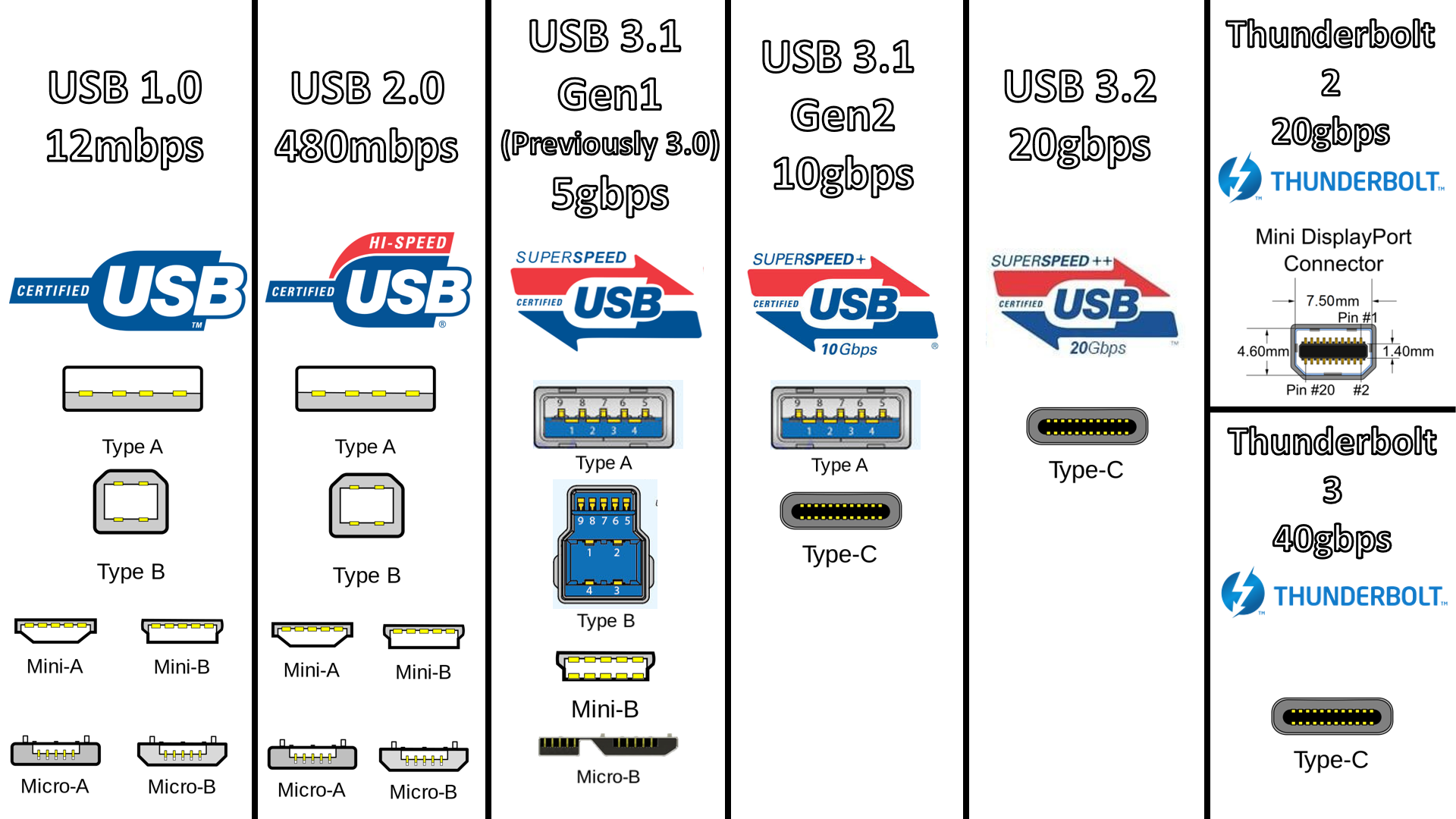
The article, USB: Port Types and Speeds Compared – Choosing the right USB cable for your computer and peripherals by Tripp Lite by Eaton, provides informative information about USB standards and connectors.
| Standard | Name | Logo | Year | Connector | Speed | Cable |
|---|---|---|---|---|---|---|
| USB 1.1 | Full Speed USB | 1998 | A B | 12 Mbps | 3 m | |
| USB 2.0 | Hi-Speed USB |  | 2000 | A (Micro, Mini) B (Micro, Mini) C | 480 Mbps | 5 m |
| USB 3.2 Gen 1 |
USB 3.0
USB 3.1 Gen 1 SuperSpeed |  |
2008 (USB 3.0)
2013 (USB 3.1) | A B (Micro) C | 5 Gbps | 3 m |
| USB 3.2 Gen 2 |
USB 3.1
USB 3.1 Gen 2 SuperSpeed+ SuperSpeed 10Gbps |  | 2013 (USB 3.1) | A B (Micro) C | 10 Gbps | 3 m |
| USB 3.2 Gen 2×2 |
USB 3.2
SuperSpeed 20Gbps |  | 2017 (USB 3.2) | C | 20 Gbps | 3 m |
| USB 4 |
USB4 Gen 2×2
USB4 20Gbps |  | 2019 | C | 20 Gbps | 0.8 m |
| USB 4 |
USB4 Gen 3×2
USB4 40Gbps |  | 2019 | C | 40 Gbps | 0.8 m |
A USB Type-C connector has twelve pins. Four pairs of pins, aka “lanes,” are used to transmit (TX) and receive (RX) data, as highlighted in the following diagram by Eaton.
Both USB 3.0 (5 Gbps) and USB 3.1 (10 Gbps) can use the Type-C connector but only one TX lane and one RX lane, depending on the orientation of the connector. USB 3.2 takes advantage of all four lanes to achieve a 20 Gbps data rate.