

- CPU jumps to the reset vector when the power is turned on.
- CPU executes the BIOS code to start the Power On Self Test (POST).
- BIOS loads the Master Boot Record (MBR) and executes the bootstrapper code.
- The bootstrapper determines the active partition and loads the OS kernel.
Hard Drive Structure
Data stored in a hard drive can be accessed through physical expressions (e.g., CHS, a combination of cylinder, head, and sector) or logical ones (e.g., LBA, arranging and numbering all sectors in a linear sequence).
A hard drive can be divided into four (primary) partitions at most. The boundaries of partitions are stored in the partition table located in the hard drive’s first sector, called the master boot record (MBR). A partition is typically formatted in a specific file system so that the operating system can manage the storage efficiently.


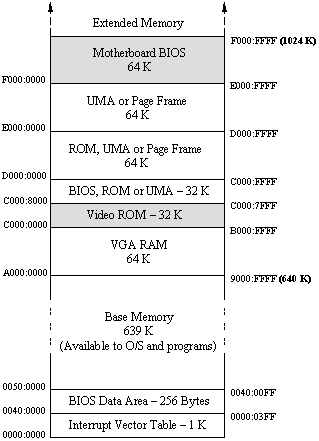
Legacy 8086 CPU Architecture


Linux Boot Process
        |                        |

0A0000  +------------------------+

        |  Reserved for BIOS     |      Do not use.  Reserved for BIOS EBDA.

09A000  +------------------------+

        |  Command line          |

        |  Stack/heap            |      For use by the kernel real-mode code.

098000  +------------------------+

        |  Kernel setup          |      The kernel real-mode code.

090200  +------------------------+

        |  Kernel boot sector    |      The kernel legacy boot sector.

090000  +------------------------+

        |  Protected-mode kernel |      The bulk of the kernel image.

010000  +------------------------+

        |  Boot loader           |      <- Boot sector entry point 0000:7C00

001000  +------------------------+

        |  Reserved for MBR/BIOS |

000800  +------------------------+

        |  Typically used by MBR |

000600  +------------------------+

        |  BIOS use only         |

000000  +------------------------+

Source: The Linux/x86 Boot Protocol: Memory Layout

Windows Boot Process


By : Yuri Diogenes, Dr. Erdal Ozkaya


References
- Power-on self-test
- Booting process of Linux
- Part IV: Techniques for Designing Effective Block Diagrams
- BIOS and Address 0x07C00
- What is Power on Self Test (POST)? How Does It Work
- Booting
- Reset vector
- Memory Map (x86)
- Intel 8086
- Real mode
- UEFI
- UEFI Explained: Windows 10/11 and UEFI
- How Computers Boot Up
- Reverse-engineering the 8086 processor’s address and data pin circuits
- Modes of Memory Addressing on x86
- 8086 Addressing Modes
- Booting process of Windows NT
- Master boot record
- GUID Partition Table
- Volume boot record
- Analyzing the Linux boot process
- Linux Boot Process Explained Step by Step in Detail
- Advanced troubleshooting for Windows boot problems
- 8086 microprocessor
- Basic Architecture
- Using EMS in QuickBASIC: Part 1
- What is MBR, it’s Working and Hacking !!
- Mass-Storage Structure